Filter Sets: A new and improved way to create segments and scoring rules

Version 5.11.0 introduces a new way to create segments in the Segment Designer and scoring rules in the Score Designer.
Previously, when using Activation Studio’s drag-and-drop functionality to create a segment or scoring rule, the resulting segment included Marketing Cloud subscribers who met the specified criteria. This happened even if the matching records were not located on the same row within a Data Extension.
Example use case

This Data Extension contains customers who have purchased various colors and types of paint. Customers 1, 2, and 3 are listed across multiple rows, with customer 2 having purchased two products. The columns display purchase details.
Use case: Select all customers who have bought Premium BLUE paint.
Using Activation Studio’s previous drag-and-drop logic, the segment would be built as follows:

This approach selects all customers who have a Variant = Premium and a Color = BLUE. In this case, customers 2 and 3 are selected. This logic does not require both conditions to be met on the same row. Consequently, it can sometimes result in unwanted customers or subscribers appearing in your segment.

This illustration shows how this segment is evaluated. It results in customers 2 and 3 meeting the criteria and being added to the segment.
Same example using the new Filter Sets
With the new Filter Sets, you can now instruct Activation Studio to segment based on criteria that must occur within a single row. You do this by grouping conditions together into a set. The resulting segment logic would look like this:

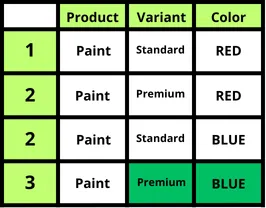
The key difference here is that both Variant and Color must match on the same row within your Data Extension or Data View. This means only customer 3 would be included in the segment.
Other use cases
Filter Sets are especially useful when segmenting data where a customer or subscriber appears multiple times. For instance, this is common when working with web interaction data collected via the Interaction Designer in Activation Studio.
You still have the flexibility to segment the traditional way. You can drag attributes separately onto the segment drag-and-drop area from a Data Extension or Data View.
Update v5.11.0
Read about our other updates here.
This update is part of our ongoing commitment to making Activation Studio the most powerful and user-friendly marketing tool. Start using these features today and explore the new capabilities!
Stay tuned for more exciting updates—we’re always working to help you maximize your marketing potential.


